

Table of Content
To improve customer experience with digital signage, businesses should focus on showing dynamic, relevant, and interactive content that solves real problems like long wait times, confusion about where to go, and the need for personalized information. By turning quiet spaces into engaging digital areas, companies can share real-time updates, provide entertainment, and offer self-service options that give customers more control. When planned well, digital signage works as a smooth link between a brand’s physical locations and its online presence, so every interaction feels useful and efficient.
Installing screens is only the first step. The best results come from focusing on the customer journey and using strong visuals and smart placement to catch attention. Whether it’s cutting perceived wait times by 35% or using interactive kiosks to speed up orders, digital signage is a flexible tool that boosts satisfaction, strengthens brand loyalty, and increases revenue in a crowded marketplace.
What Is Customer Experience in the Context of Digital Signage?
Key Components of Customer Experience
Today, customer experience (CX) is the total of every contact a person has with a brand. It is about more than a single purchase. It covers the emotional and practical journey from the moment they enter a space to the moment they leave and beyond. Key parts of CX include how easy things are to use, how fast service is, and how good and clear the information is. When customers feel supported and appreciated, their satisfaction rises, which encourages repeat visits and a strong brand reputation.
Digital signage fits this picture by acting like a quiet assistant. It gives the clarity and engagement modern customers expect. By easing common shopping frustrations-like waiting in line or trying to find a certain area-digital displays help create a smooth experience where customers feel in control and well-informed.
Why Digital Signage Plays a Role in Customer Engagement
People are naturally drawn to movement, light, and new visuals. Research shows that attention spans are short, and static signs often go unnoticed. Digital signage stands out with bright video and live updates, often becoming the first thing visitors notice. It cuts through everyday distractions and pulls attention to important messages that might otherwise be ignored.
Digital signage is also more flexible than traditional signs. Content can change quickly to match the time of day, weather, special events, or current stock levels. This quick response keeps messages relevant, helping the brand feel present and attentive to what customers need right now.
How Digital Signage Changes Customer Experience
Benefits of Digital Signage for Customer Interaction
A key benefit of digital signage is its ability to turn a passive viewer into an active participant. Instead of just reading a poster, customers can use touchscreens to browse product catalogs or scan QR codes to keep information on their phones. This interaction creates a more memorable visit and turns a simple trip into an engaging experience.
From an operations point of view, digital signage also makes communication smoother. It cuts printing costs and the need to replace paper signs, while keeping messages consistent across different locations. With central content control, businesses can instantly share emergency alerts, social media feeds, or promotions, which builds trust and reliability.
Common Use Cases across Industries
In retail, digital signage is a strong tool for upselling and cross-selling. Studies show it can draw 76% of new customers into stores they have never visited before. Grocery stores use it to show seasonal recipes or current stock, while high-end boutiques use it for brand stories with cinematic visuals. In these settings, the screen acts like an extra salesperson, working all day to inspire shoppers.
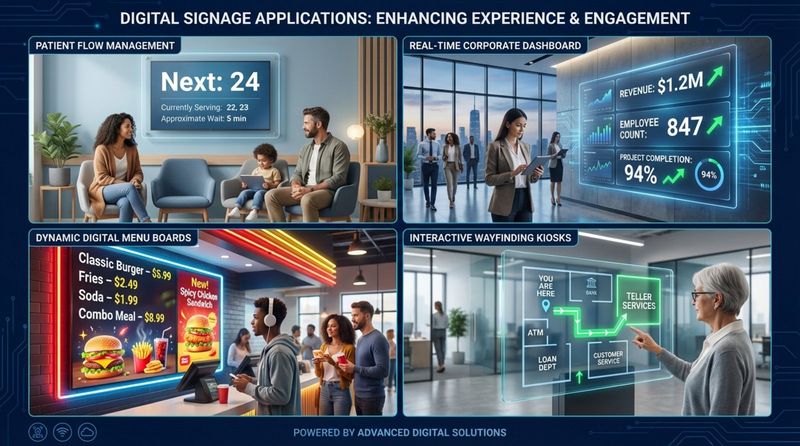
Many other sectors use digital signage as well. Healthcare centers display estimated wait times to reduce patient stress. Corporate offices share KPIs and company news on screens instead of filling inboxes. In hospitality and banking, interactive displays help with directions and queue systems, making the first minutes of a visit feel smooth and productive instead of confusing.
Types of Digital Signage Solutions for Customer Experience
Video Walls and Large-Format Displays
For businesses that want a strong first impression, video walls are a leading choice. These large displays are common in hotel lobbies, flagship stores, and corporate headquarters, where they show off brand identity. With high-resolution animations and eye-catching graphics, video walls create a sense of innovation and status that visitors notice right away.
When creating content for these big screens, match the playlist aspect ratio to the virtual display so images are not stretched or distorted. These walls are useful for more than décor. They can show live entertainment, data dashboards, or product demos in busy areas, keeping customers engaged and the brand front of mind.
Digital Menu Boards (for Hospitality and Retail)
Digital menu boards have changed how quick-service restaurants (QSRs) and cafes operate. Unlike static menus, they let staff instantly update prices, remove sold-out items, and highlight specials based on time of day-like breakfast in the morning and snacks at night. This flexibility prevents disappointment and sets clear expectations.
Outside food service, retail and service businesses use menu-style boards to list services, plans, or packages. These boards can connect with POS systems for accurate pricing and availability. Customers benefit from clear, visual layouts that speed up decisions and often raise the average amount spent per visit.
Wayfinding and Navigation Displays
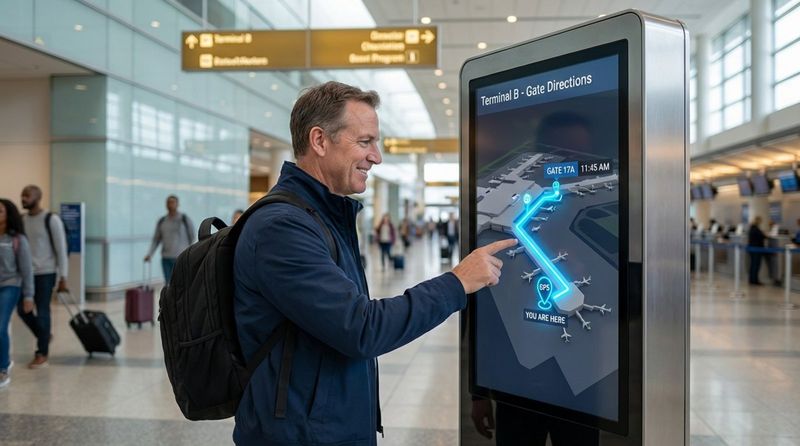
Finding your way through a large hospital, mall, or airport can feel overwhelming. Wayfinding displays work like digital maps, showing clear directions that guide visitors where they need to go. By reducing the stress of getting lost, these screens increase overall satisfaction and make large spaces feel easier to use.
More advanced wayfinding tools include interactive maps that let users search for specific stores, departments, or offices. This gives visitors more control, while freeing staff from simple “where is…?” questions. In large venues or supermarkets, these displays can also point people to events, offers, or featured products, improving their trip through the space.
Interactive Digital Kiosks
Interactive kiosks offer a self-service option that many customers welcome. Whether they are ordering food, checking a price, or browsing an extended catalog, kiosks let customers manage their own experience. This independence appeals to those who prefer less face-to-face interaction or who want time to explore without pressure.
Kiosks are also valuable for collecting data. Businesses can track which products people search for and ask for quick feedback at the end of a session. This information gives real-time insight into customer behavior and helps improve the in-store experience based on actual user choices.
Best Practices for Using Digital Signage to Improve Customer Experience
Creating Compelling and Relevant Content
The impact of any digital signage setup depends on what appears on the screen. Content should be short, clear, and visually engaging. Avoid long text; use motion graphics and strong images to tell a story. The aim is to catch attention quickly and give value through a useful tip, a striking visual, or a timely offer.
Relevance matters just as much. Content should match the audience that is present at that moment. For example, a store might show one type of message to early shoppers and another to evening visitors. By speaking directly to different groups, the brand feels more personal and attentive.
Keeping Clarity and Readability High
If people cannot read a digital sign quickly, it is failing its main job. Design should focus on high contrast, large fonts, and the right screen size for the viewing distance. Avoid clutter and too many elements competing for attention. A simple layout usually works better than a busy one. Make sure key details-like a price, direction, or call-to-action-stand out most.
The physical setting also affects readability. Screens must be bright enough to stand out in strong indoor light or sunlight. Place them at a natural eye level, where people can see them without effort. By thinking carefully about where and how screens are viewed, businesses can make messages clear to everyone passing by.

Updating Content in Real Time
Out-of-date content quickly reduces the impact of digital signage. Using a strong Content Management System (CMS) lets businesses update screens instantly from anywhere. This is especially helpful for daily offers, sudden announcements, or real-time data like weather, news, or live scores. Fresh content encourages repeat visitors to keep looking at the screens.
Real-time updates also support quick marketing responses. If an item is selling fast, signage can be changed to show a countdown or highlight demand. If a product runs out, it can be removed from the screen right away to avoid confusion and keep the shopping experience honest and smooth.
Aligning Messaging with Brand Identity
Digital signage should be part of the full brand experience, not a separate channel. Use the same colors, fonts, logos, and tone as other marketing materials. When customers see your digital displays, they should instantly recognize your brand, which builds trust.
Well-made, consistent visuals back up your mission and values. Whether you are highlighting sustainability, quality, or innovation, screens give a bright, flexible space to share these messages. When content reflects who you are as a business, the customer experience feels more unified and professional.
Practical Tips to Improve Customer Experience Using Digital Signage
Include Interactive Features and Touchscreens
Move beyond one-way messages and let customers interact. Touchscreens can host games, product builders, quizzes, or detailed info panels that hold attention longer than a simple content loop. This hands-on format makes visits more memorable and can build a stronger emotional link with the brand.
Use Personalization and Dynamic Messaging
Use data to make content feel personal. Adjust screens based on location, time, local events, or known customer patterns. When people feel like messages speak directly to them, they pay more attention and are more likely to buy.
Improve Wayfinding and Navigation
Keep your directional content clear and easy to follow. Use simple icons, straightforward labels, and, where possible, interactive maps. Helping customers reach their destination quickly reduces stress and gives them more time to enjoy your services, which leads to happier visits.
Use Queue Management Systems
Lines are often the most annoying part of a visit. Use digital signage to support queue systems by showing wait times, ticket numbers, and which counter is free next. Clear updates reduce uncertainty, make waits feel shorter, and keep people calmer and more satisfied.
Provide Entertainment and Educational Content
Don’t only sell-also inform and entertain. In waiting areas, play short videos, live news, trivia, how-to content, or product explainers. Keeping people entertained or teaching them something useful can ease boredom and improve how they feel about their visit.
Offer Self-Service Options through Digital Kiosks
Give customers tools to help themselves with tasks like check-in, ordering, returns, or price checks. Self-service options reduce pressure on staff, speed up service, and appeal to people who value speed and independence over traditional counter service.
Integrate QR Codes and Mobile Interactions
Connect large screens with customers’ phones. Adding QR codes lets people quickly save offers, menus, maps, or loyalty sign-up pages to their devices. This touch-free link is simple to set up and very effective for generating leads and extending the experience beyond the store.
Highlight Product Catalogs and Menus
Use digital displays to show a wider range of products or services than you can fit on shelves or printed boards. A digital catalog lets customers browse sizes, colors, or options that may not be on display. Dynamic menus can showcase high-margin items or seasonal favorites with attractive images to guide choices.
Showcase Reviews and Social Proof
Build trust by showing real customer reviews, ratings, and social media posts. Seeing other people’s positive experiences helps new customers feel more confident, reducing doubts and encouraging them to buy.

Measuring the Impact of Digital Signage on Customer Satisfaction
Key Metrics to Track: Engagement, Dwell Time, and Sales
To know if your digital signage is helping customer experience, track clear metrics. Dwell time-the length of time someone looks at a screen-shows how engaging your content is. Tracking sales “lift” for items featured on screens reveals how much signage affects buying behavior. Some systems also use anonymous sensors to measure how many people watch, for how long, and basic audience data.
Look beyond sales, too. Watch for shorter wait times, fewer people asking staff for directions, or smoother check-in flows. Better efficiency often means a better customer experience. By following key performance indicators (KPIs) regularly, businesses can adjust content and placement to increase return on investment and customer satisfaction.
Collecting and Using Customer Feedback
Digital signage can help collect feedback directly. Interactive kiosks can ask for a star rating, a quick survey, or a simple “Was this helpful?” at the end of an action. This delivers fresh, direct input while the experience is still on the customer’s mind and shows where your setup may need improvement.
Use this feedback to guide changes. If people say navigation is still confusing, update or simplify your maps and directions. If a certain interactive feature is popular, expand on that idea. Listening closely to feedback helps keep your digital signage useful, instead of turning into background noise.
Frequently Asked Questions on Improving Customer Experience with Digital Signage
What are the most common mistakes to avoid in digital signage?
A common mistake is “content fatigue,” where the same loop runs for months and regular visitors stop noticing it. Another issue is crowding the screen with too much text or using fonts that are too small for the viewing distance. Many businesses also fail by treating screens as stand-alone billboards rather than part of the full customer journey and marketing plan.
Ignoring hardware is another problem. Screens that are off, flickering, or showing error messages harm the brand image. Reliable screens, players, and network connections are just as important as the content. Also avoid showing only hard-sell ads. Mix promotional messages with helpful tips, information, or entertainment to keep people engaged.
How often should digital signage content be updated?
Update content as often as customer situations change. A retail store with weekly deals should refresh content at least weekly, while live updates for weather, news, or events are even better. In high-traffic places like offices, transport hubs, or malls, content should change daily, or even several times a day, so regular visitors always see something new.
Using a CMS with scheduling tools makes this manageable. You can set different playlists for times of day, days of the week, or seasons. Regularly check performance data-if an offer or message does not perform well, replace it quickly with something more effective.
Can digital signage be integrated with mobile devices?
Yes, and this can strongly improve customer experience. With QR codes, NFC tags, or custom mobile apps, digital signage can connect directly to smartphones. This supports a seamless journey where a customer sees an offer on a screen, saves it to their phone, and uses it at checkout or later at home.
Mobile links can also support interactive games, surveys, or step-by-step directions that continue on the user’s device. By combining the impact of large screens with the personal nature of mobile phones, businesses can create a smooth, modern experience that feels quick and convenient.
Key Takeaways for Maximizing Customer Experience Using Digital Signage
As physical spaces become more connected, digital signage is moving from a “nice to have” to a strategic must-have. It lets businesses communicate at the speed customers expect, giving information that is timely, relevant, and often personalized. The best setups treat screens as active touchpoints in a people-focused strategy, not just as hardware on a wall.
Investing in digital signage means investing in better relationships with customers. By reducing everyday friction-faster service, clearer guidance, better entertainment, or more helpful information-brands can build loyal communities of customers who feel noticed and appreciated. As technology advances, new tools like sensors, data analytics, and smarter content will expand what is possible, making now a strong time to build and refine your digital signage approach.


