


Table of Content
Deciding between the Amazon Fire TV Stick and Xiaomi Mi TV Stick for your display setup? If you need raw processing power and Wi-Fi 6 reliability for smoother playback, the Amazon Fire TV Stick (specifically the 4K Max) is often the stronger candidate; however, if you require a native Android TV environment with built-in Chromecast for easy casting, the Xiaomi Mi TV Stick is the better fit.
Both devices offer a simple "plug-and-play" solution to turn standard screens into smart displays. While they share similar form factors and streaming capabilities, their underlying software and performance limitations can impact your experience significantly. Whether you are upgrading a living room TV or deploying a cost-effective digital signage network, understanding these differences ensures you pick the right tool for the job.

Amazon Fire TV Stick vs. Xiaomi Mi TV Stick: Key Differences
What are the main features of Amazon Fire TV Stick?
The Amazon Fire TV Stick is defined by its integration with the Amazon ecosystem and the Alexa Voice Remote. This allows you to control content, search for media, and manage connected smart devices using voice commands. Recent models, such as the Fire TV Stick 4K Max, support high-end video formats like Dolby Vision, HDR10+, and HLG, delivering crisp visuals if your screen hardware supports them.
Beyond entertainment, the Fire TV Stick is a popular hardware choice for businesses using digital signage software. Its reliable architecture and Wi-Fi 6 capability (in newer models) make it a stable option for maintaining connection in busy environments. It runs on Fire OS, giving you access to a vast library of applications through the Amazon Appstore.

What are the main features of Xiaomi Mi TV Stick?
The Xiaomi Mi TV Stick runs on Android TV, providing a clean, standard Google interface. Its standout feature is the built-in Chromecast, which allows you to cast visuals directly from a phone or laptop to the screen without complex setup. This makes it particularly useful for meeting rooms or collaborative spaces where quick sharing is a priority.
Integration with Google Assistant is seamless, allowing for voice control via the remote. The Xiaomi TV Stick 4K model upgrades the experience with Ultra HD resolution and Dolby Atmos audio support, making it a viable alternative for those who prefer the Google ecosystem over Amazon’s interface.

Design and build comparison
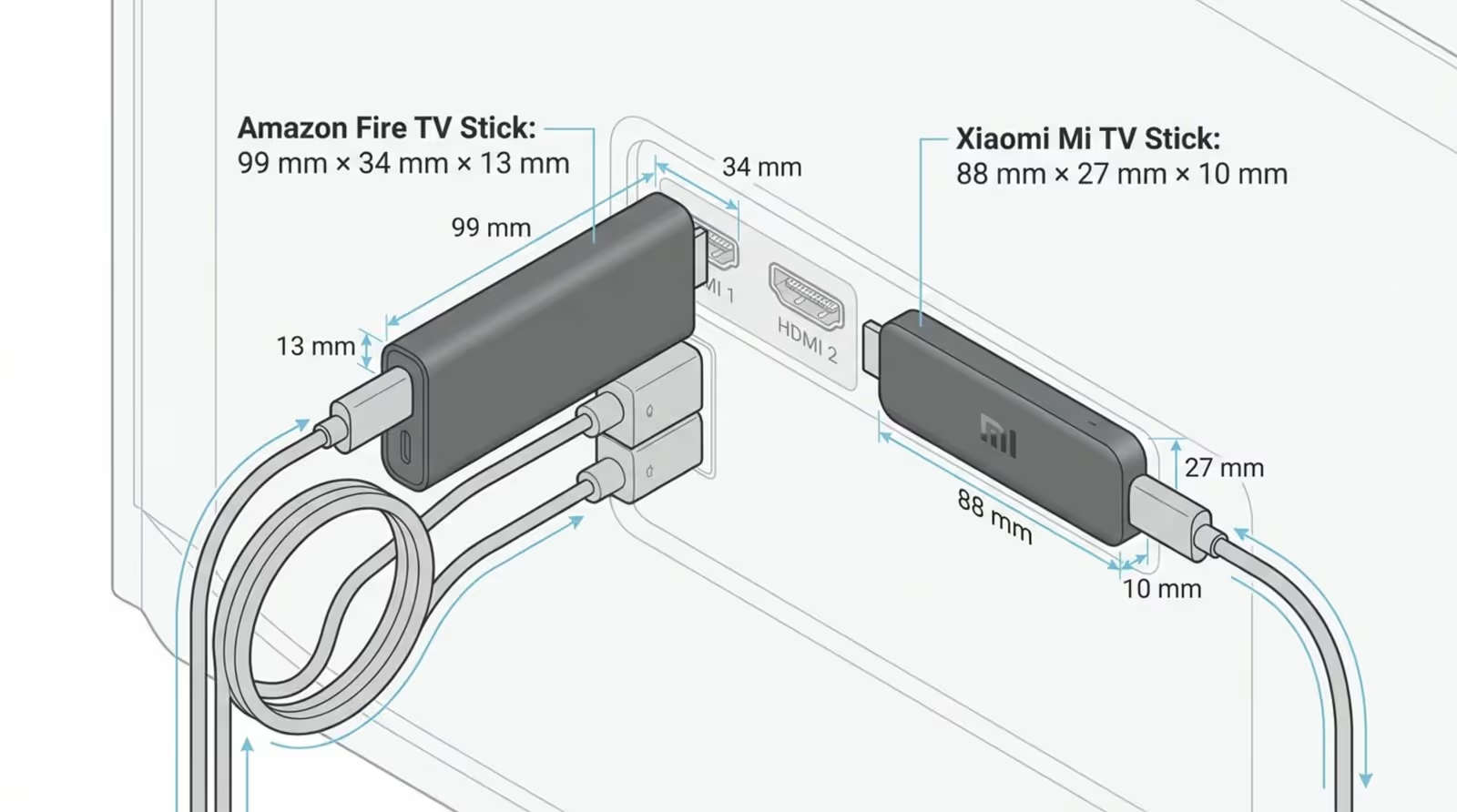
Physically, the devices are quite similar but have distinct footprints. The Amazon Fire TV Stick is slightly wider, which can sometimes obstruct adjacent HDMI ports on a monitor or TV. Amazon typically addresses this by including a short HDMI extender in the box to ensure a proper fit. Many models can be powered directly from a TV’s USB port, reducing cable clutter.
The Xiaomi Mi TV Stick has a slimmer, elongated profile (92 mm x 30 mm), generally making it easier to fit in tight spaces behind wall-mounted screens. While it is compact, it often requires an external power source rather than relying solely on the TV’s USB output. Like Amazon, Xiaomi has begun including extenders in newer batches to improve compatibility with recessed ports.
User interface and operating system differences
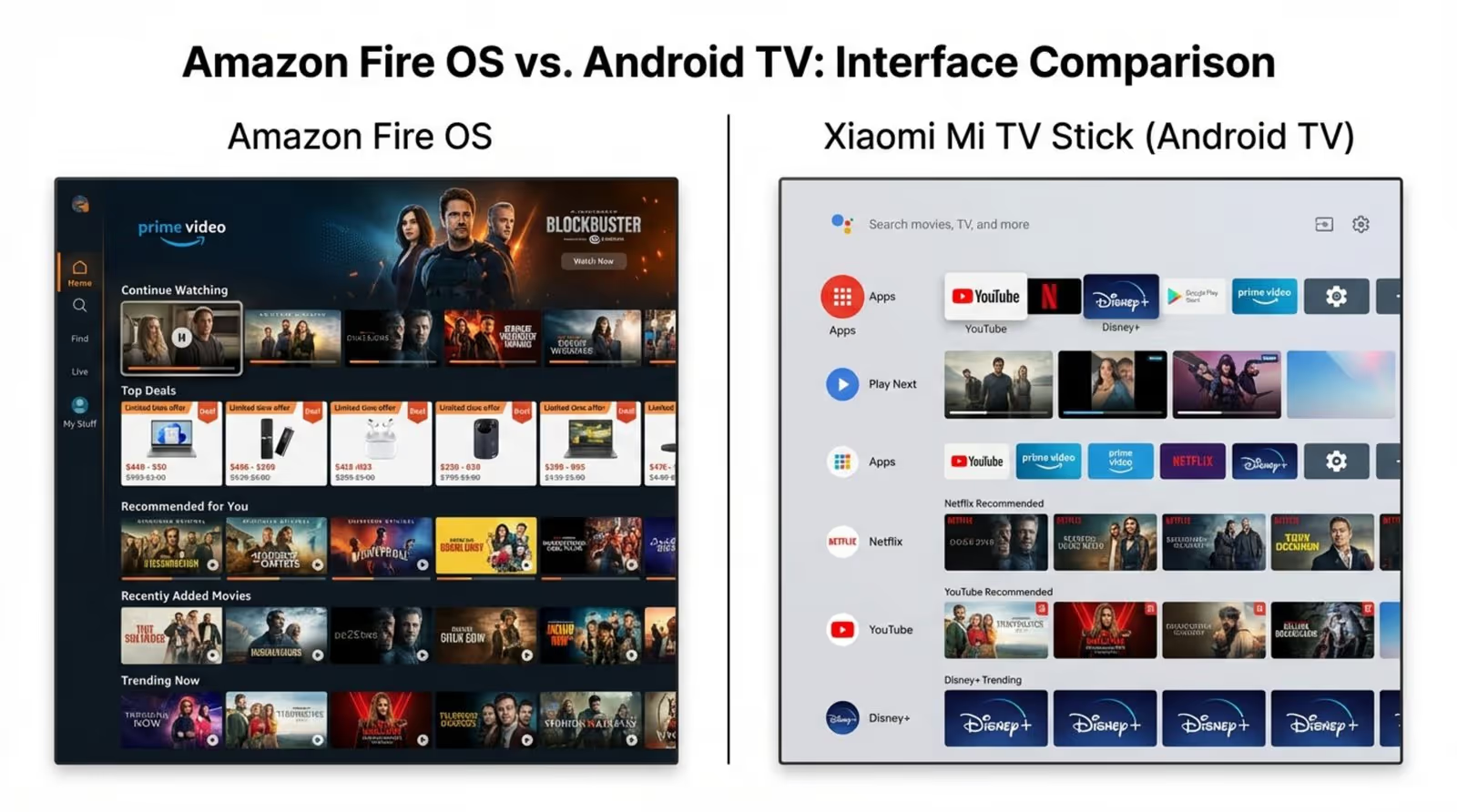
The operating system is the most noticeable difference. Fire OS on the Amazon Stick is heavily tailored to Amazon Prime content, featuring a media-centric home screen. While efficient, the interface is busy. However, the system is highly optimized and typically feels responsive even during long operation sessions.
The Xiaomi Mi TV Stick utilizes a standard Android TV interface. This layout relies on customizable rows and tiles, allowing you to prioritize the apps you use most. While many users prefer this cleaner look, the entry-level 1080p Mi Stick can experience lag if overloaded with tasks. For teams already using Google Workspace or Android devices, the familiarity of this interface is a significant advantage.
Which device supports more streaming apps and platforms?
Both platforms support major streaming services like Netflix, YouTube, and Disney+. Xiaomi has a slight edge in flexibility due to the Google Play Store, which offers a broader range of utility apps and media players like Kodi or VLC. However, the Amazon Appstore is robust and frequently receives updates for major applications first.
For business users, both devices are excellent entry points for professional screen management. We recommend Look Digital Signage as the ideal software solution for either stick. You can easily install the Look App (available for both Fire OS and Android TV) to transform these consumer devices into professional players. This setup allows you to utilize smart scheduling to automate content and relies on offline playback to keep your screens running even if the Wi-Fi drops.
Performance and Streaming Quality
Processor, RAM, and storage comparison
In terms of raw hardware, Amazon usually leads. The Fire TV Stick 4K Max utilizes a 2.0 GHz quad-core processor and 2GB of RAM, resulting in snappy menu navigation and faster app loading times. The standard 1080p Xiaomi Mi TV Stick typically runs on a slower 1.5 GHz quad-core chip with only 1GB of RAM, which can lead to sluggish performance when switching between heavy applications.
Storage is also a consideration. Most budget sticks, including the Xiaomi, are limited to 8GB of internal storage, much of which is occupied by the system. Amazon’s newer 4K Max models have increased this to 16GB, providing more breathing room for caching content-a critical feature if you are using digital signage to store large video files locally.

Video resolution and HDR support
If your screens are 4K, ensure you select the correct model. The Amazon Fire TV Stick 4K supports Ultra HD, Dolby Vision, and HDR10+, offering excellent clarity for digital menus or detailed promotional videos. The standard Xiaomi stick is limited to 1080p, though the specific "Xiaomi TV Stick 4K" model matches Amazon’s resolution capabilities.
Both devices handle HLG (Hybrid Log Gamma), ensuring compatibility with modern broadcast standards. However, the Fire Stick’s superior processor helps maintain a steady 60fps frame rate during demanding visual sequences, reducing the risk of stuttering.
App loading speed and multitasking capabilities
Thanks to the superior processor and RAM, the Amazon Fire TV Stick launches applications faster. Transitioning between a video loop and a live dashboard feels fluid. The Xiaomi Mi TV Stick, particularly the 1080p version, may exhibit hesitation or minor jitter when navigating the home screen while background processes are running.
Once content begins playing, both devices offer reliable playback. The performance gap is mostly felt during navigation, app switching, or initial startup.
Connectivity and Remote Features
Wi-Fi and Bluetooth support
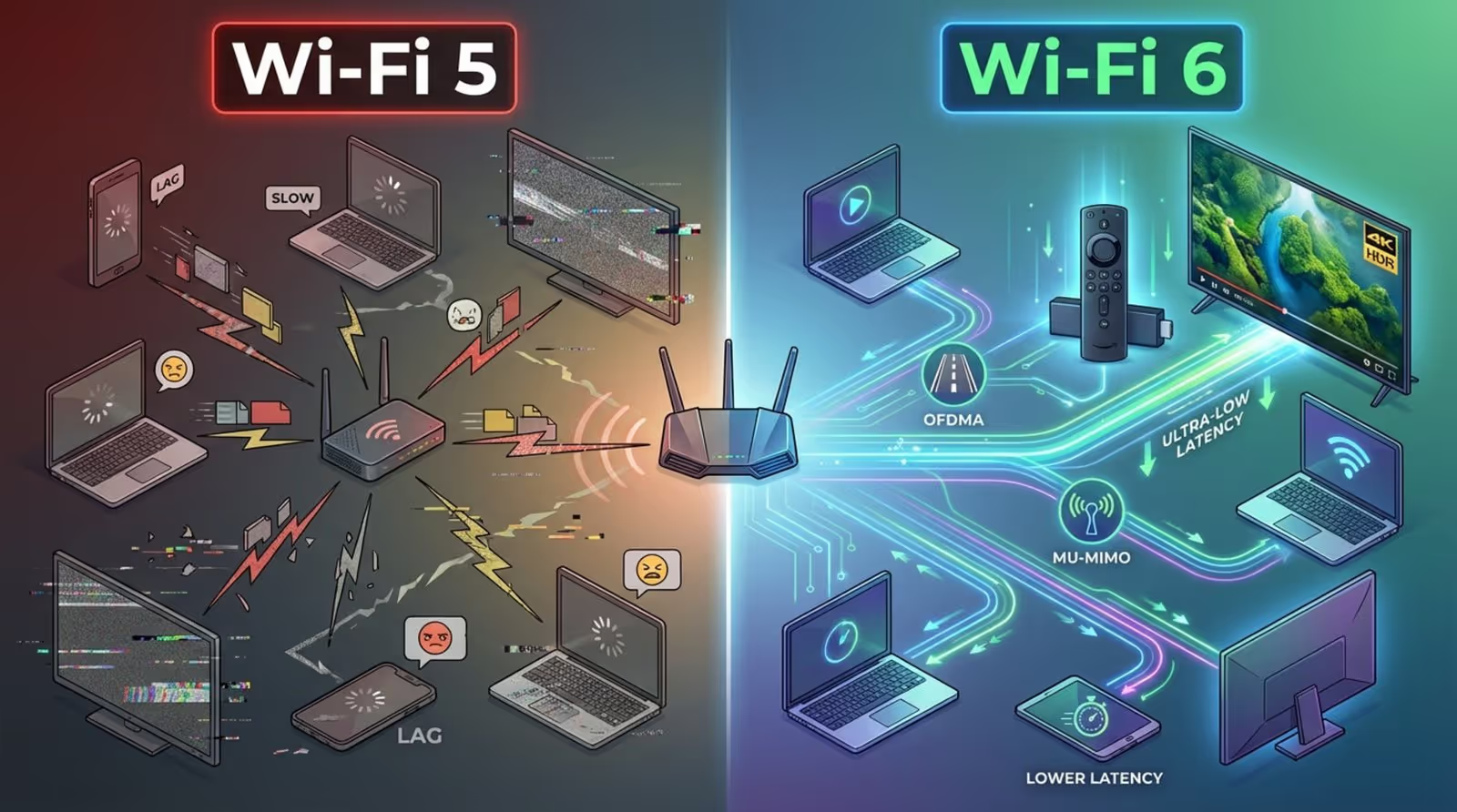
Connectivity is critical for keeping your screens online. The Fire TV Stick 4K Max supports Wi-Fi 6 (802.11ax), offering a more stable connection in environments with many competing signals, such as retail stores or offices. The Xiaomi Mi TV Stick typically supports Wi-Fi 5 (802.11ac), which is sufficient for most streaming but less future-proof.
Regarding Bluetooth, Amazon’s latest models utilize Bluetooth 5.2, whereas Xiaomi generally uses 4.2 or 5.0. Newer Bluetooth standards provide better range and stability if you are connecting wireless audio devices or peripherals.
Ports and compatibility with TVs
Both sticks utilize a standard HDMI 2.0 connector. Neither device includes a built-in Ethernet port, meaning you must rely on Wi-Fi unless you purchase a specific USB-to-Ethernet adapter. This is a key consideration for businesses that prefer hardwired connections for security.
Power is supplied via Micro-USB for both brands; USB-C is not yet standard on these models. As these devices lack SD card slots, you are limited to the internal storage for any cached media or apps.
Remote design and voice assistant capabilities
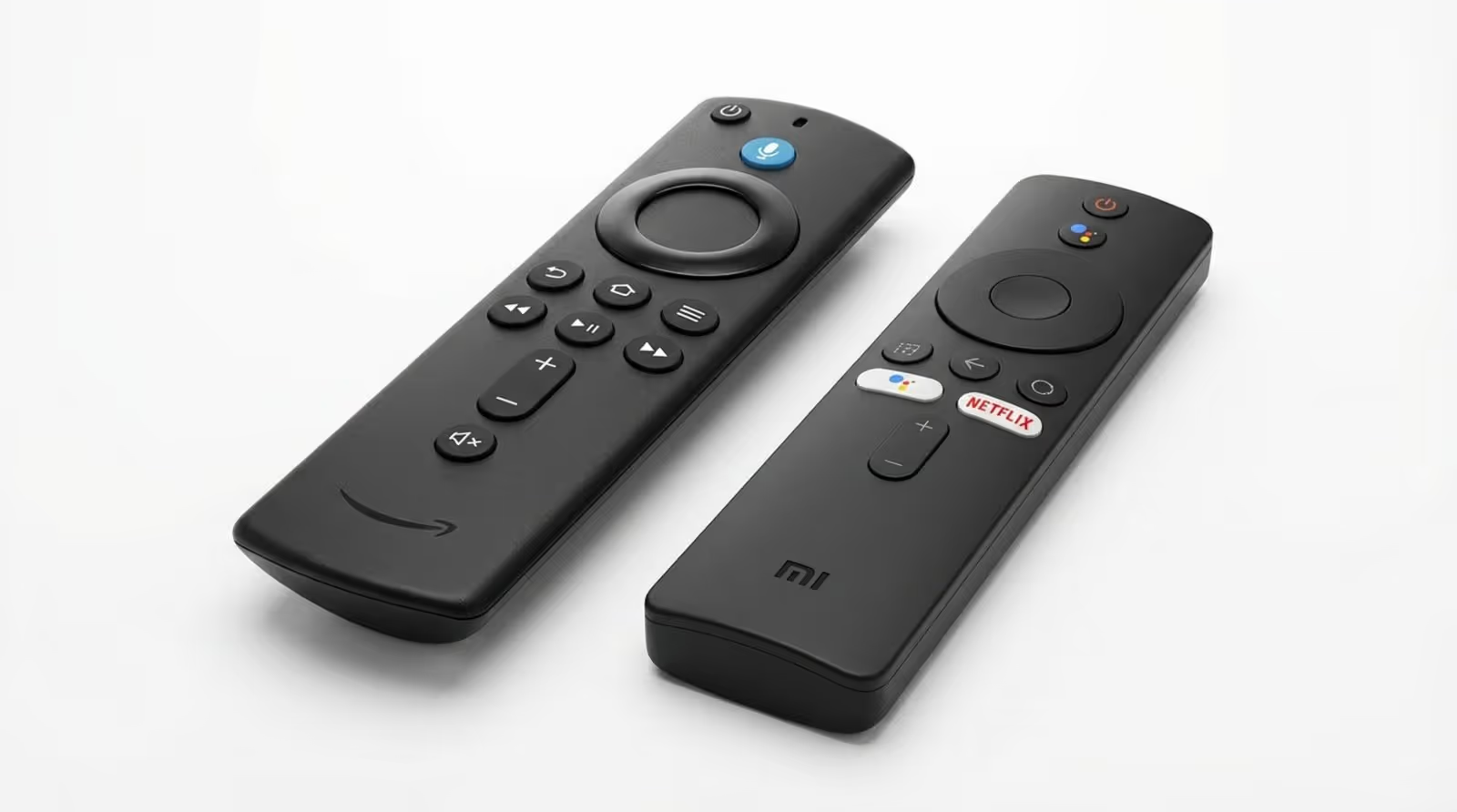
The Amazon Alexa Voice Remote is functional and dense, featuring playback controls and shortcut buttons. Alexa is highly capable for smart home commands. The remote is durable and ergonomic, making it a solid choice for daily use.
Xiaomi’s remote adopts a minimalist design with fewer buttons. It includes dedicated keys for major streaming platforms and a Google Assistant button. While sleek, some users may miss dedicated media controls like fast-forward and rewind, which Amazon includes by default.
App Availability and Ecosystem
Availability of streaming services
Both devices are certified for major platforms like Netflix and Prime Video, ensuring high-definition playback with proper DRM support. App availability is rarely an issue for mainstream content consumption on either device.
Support for IPTV and third-party apps
Android TV on the Xiaomi stick is often preferred by users who wish to sideload applications or use specific IPTV tools not found in standard stores. While Amazon allows sideloading, the process has become more restrictive in recent OS updates.
For professional use cases, both ecosystems support the Look App (Free Player App). This allows you to bypass the consumer interface entirely. Once installed, the Look App can be set to launch automatically, turning the stick into a dedicated signage player managed via the Look CMS.
Integration with smart home devices
Your existing hardware should guide your choice. If your facility uses Echo devices or Ring security products, the Fire TV Stick integrates natively. Conversely, if you rely on Google Nest Hubs or Google Home, the Xiaomi Mi TV Stick will fit seamlessly into your existing control network.
Price and Value for Money
Amazon Fire TV Stick pricing
Amazon utilizes dynamic pricing. The entry-level HD model is highly affordable (often around $20-$25), while the robust 4K Max model ranges between $35 and $55. Frequent sales make Amazon devices very cost-effective for bulk deployments.
Xiaomi Mi TV Stick pricing
Xiaomi pricing is generally stable. The 1080p model hovers around $40, with the 4K version costing between $50 and $70. While competitive, they rarely see the deep discounts associated with Amazon’s ecosystem.
Are there additional costs or hidden fees?
There are no mandatory monthly fees for the hardware itself. However, the Fire TV Stick interface heavily promotes Prime content, which can be intrusive if you are not a subscriber. The Xiaomi interface is more neutral.
Which offers better value?
For the absolute lowest cost of entry with high performance, the Amazon Fire TV Stick is difficult to beat during sales. For users who need built-in casting capabilities without buying extra dongles, the Xiaomi Mi TV Stick offers better integrated value.
User Experience and Reviews
Setup and ease of use
Both devices are designed for simple setup. Amazon devices purchased online can arrive pre-linked to your account, further speeding up the process. Xiaomi requires a Google account login; while generally smooth, the "Quick Setup" via phone can occasionally be inconsistent.
Customer feedback and ratings
Users consistently praise the Fire TV Stick for its speed and the quality of the remote. The Xiaomi Mi TV Stick earns high marks for its clean interface and Chromecast utility but often receives criticism regarding the speed of the older 1080p model.
Which Streaming Stick Should You Choose?
Factors to think about before making a decision
Check your screen resolution and network capabilities first. There is no need for a 4K stick on a 1080p monitor unless you need the faster processor for complex content. If your environment has Wi-Fi 6, the Fire TV Stick 4K Max is the logical choice to ensure smooth streaming.
Who should buy the Amazon Fire TV Stick?
The Amazon Fire TV Stick is the right choice for:
- Teams needing a fast, responsive interface for heavy content.
- Environments with Wi-Fi 6 routers.
- Users looking for the most affordable hardware during sales.
- Those utilizing Look Digital Signage who want a highly stable, certified player.
Who should choose the Xiaomi Mi TV Stick?
The Xiaomi Mi TV Stick is the right choice for:
- Users who prefer a clean, tile-based Android interface.
- Environments that need easy casting from phones via Chromecast.
- Installations requiring a slim profile to fit behind flush-mounted screens.
- Users who want access to the broader Google Play Store ecosystem.

Both devices are capable hardware solutions that prove you don't need expensive proprietary players to get started with smart screens. By pairing either stick with Look Digital Signage, you can ensure your content is managed professionally. The Look App provides the stability of offline playback and the convenience of remote management, allowing you to control your messaging from anywhere, regardless of which hardware you choose.





