
Table of Content
Choosing open source digital signage software depends mostly on how strong your technical team is and what you want long term. In short: open source works very well for companies with strong internal IT teams that want extreme customization and no license fees. But it can become a problem for organizations that want a simple, “set-it-and-forget-it” system. The $0 starting price looks attractive, but the real cost often shows up as developer time, security work, and constant effort to keep everything running.
Looking ahead to 2026, the choice is no longer just about features, but also about the hosting setup and the support around the software. As we look more closely at open source, you have to look past the “free” label and understand the day-to-day workload that comes with full control over your code.
What Is Open Source Digital Signage Software?
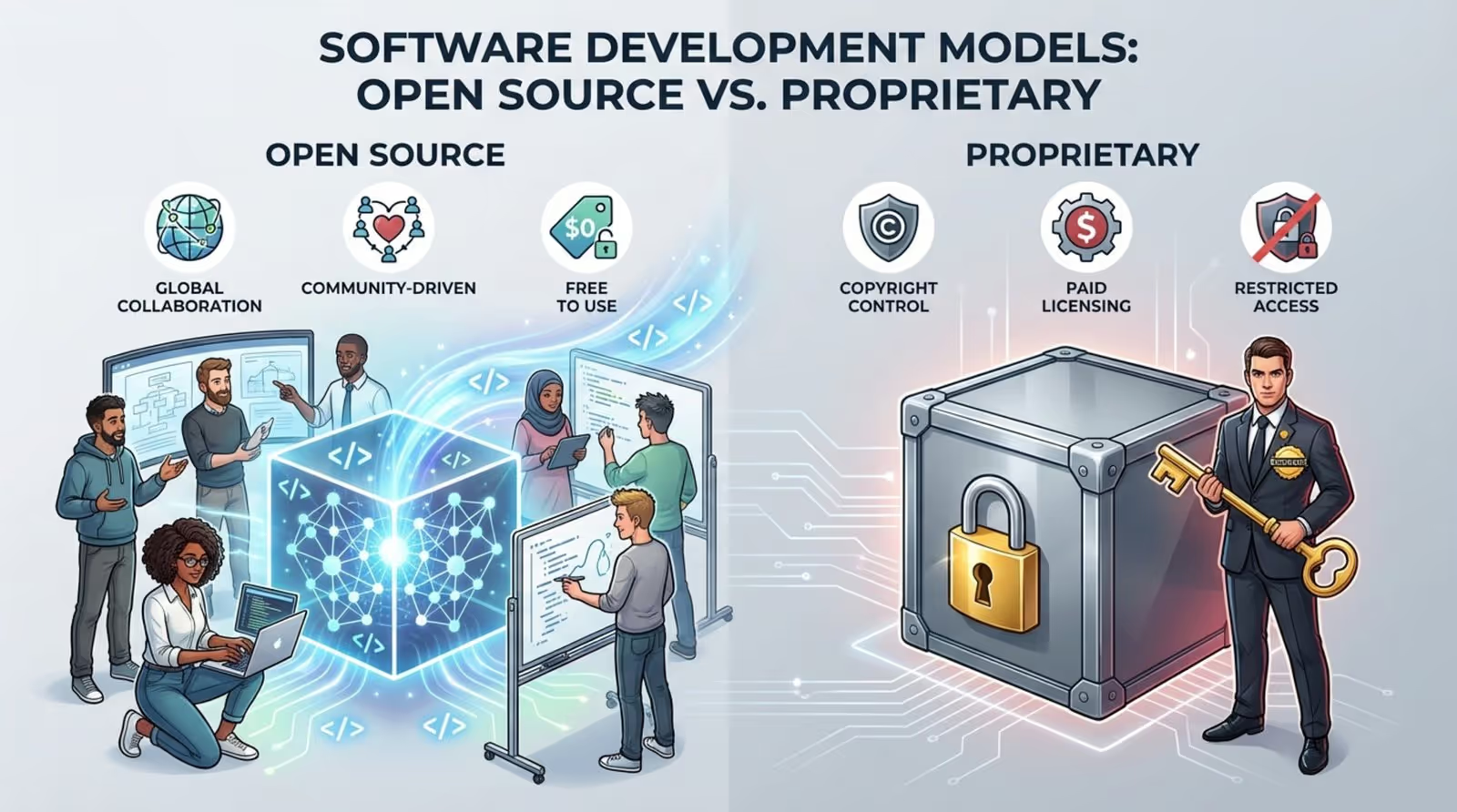
Open source digital signage software is software whose source code is publicly available. Anyone can view it, change it, and share it. With closed (proprietary) systems, the vendor hides the code and controls everything. Open source systems, on the other hand, are often driven by communities or used by companies as a base layer they can build on. The idea is “free as in freedom”: you can adjust the system to your exact needs without asking a vendor for permission.
How Does the Open Source Model Work for Digital Signage?
With open source, development and hosting are spread out rather than handled by a single provider. Instead of paying a subscription for a fully managed service, a business downloads the code and becomes fully responsible for it. That usually includes hosting it on their own servers-on-premise or in the cloud-and managing the database and Linux systems often needed to run it.
In this setup, the user owns the whole infrastructure. If you need a feature that doesn’t exist yet, your developers can write it. This is very different from SaaS platforms where you have to wait for the vendor’s roadmap. But this freedom also means your team must handle server setup, backups, monitoring, and uptime on its own.
What Features Are Typical in Open Source Solutions?
Most open source signage projects include a solid base of standard tools. You usually get media playback, simple scheduling, basic layouts with zones, and playlist management. For small pilots, schools, or hobby projects with simple needs, this can be more than enough.
However, these platforms often do not include the more advanced features you see in managed enterprise tools. Things like role-based user permissions, advanced multi-site control, and automatic security updates are often missing. To get these, organizations usually need to spend a lot of development time building them or adding outside plugins, which can differ a lot in quality and reliability.
What Are the Differences Between Open Source and Proprietary Digital Signage?
The main difference is who carries the responsibility and who controls the code. Proprietary software is closed: the vendor writes and owns the code, ships updates, and usually offers a service-level agreement (SLA). You pay for a ready environment where the vendor handles most technical tasks. Open source, by contrast, is open code that you must support yourself.
Another big difference is how software and hardware fit together. Proprietary systems often ship as bundles with hardware that has been tested and tuned for that software, which reduces glitches. Open source players can run into hardware compatibility issues, especially at larger scale. While proprietary tools like Look DS aim to be “invisible” (they just run in the background), open source systems need constant attention from your IT team to keep working well.
Key Benefits of Open Source Digital Signage Software
Open source is very attractive for organizations that see technology as a key strength, not just a utility. For a strong technical team, having full access to what’s happening inside the signage system is a big advantage that closed systems usually do not offer.
No Licensing Fees and Lower Upfront Costs
The first and clearest benefit is that there are no ongoing license fees. For startups, nonprofits, or test projects with limited budgets, being able to run a professional display without a per-player subscription can be a huge plus. With no license barrier, you can try digital signage without making a big financial commitment.
This “free” aspect applies only to the software. You still need to buy screens, media players, and likely pay for hosting. But the money you don’t spend on licenses can go into better displays or better content. For a school or local center, this might be the difference between running one display or several.
Flexibility and High Customizability
Open source gives you a level of flexibility that is hard to match with closed tools. If your marketing team needs a very specific integration-such as pulling real-time data from a private internal system or building a unique touch experience-your developers can directly change the code to make it happen.
Because there are no vendor limits on how you change the system, your team can adjust the backend logic, redesign the interface, or build custom widgets. This makes open source attractive for businesses that must react quickly to changing customer needs or want a unique brand experience that does not look like standard vendor templates.
Reduced Vendor Lock-In
Vendor lock-in is a common worry in IT. If a proprietary vendor shuts down, gets sold, or changes its pricing model, customers can be stuck with few choices. With open source, you keep more control. You host the software and hold the source code, so you are not tied to one provider’s survival or their future plans.
This keeps your long-term position more stable. Even if the original open source community slows down or disappears, you still have the code. You can hire outside developers, build an internal team, or take the project in a new direction that matches your business needs.
Community-driven Support and Innovation
Open source often leads the way on new technology. Many tools in areas like big data, AI, and modern databases first appeared as open source projects before commercial products adopted them. By using open source, you can benefit from a large pool of developers who add bug fixes, plugins, and improvements over time.
This community model supports openness and shared problem-solving. When someone finds a security issue, many people can review and fix it, sometimes faster than a corporate support chain. For developers, contributing to these projects is also a way to show skills and build a public track record.
Transparency and Investment Security
Transparency is one of the main strengths of open source. Organizations can read the code and confirm there are no hidden backdoors or tracking tools, which is very important for privacy-focused IT teams. New technical staff can also get up to speed more quickly because they can read the code and docs without going through heavy legal agreements.
Your investment is safer because the knowledge of how the system works is in the code, not just in one vendor’s head. If a key developer leaves your company, another one can study the code and keep going. You are investing in your own setup and your team’s skills instead of a short-term contract with an outside vendor.
Risks and Disadvantages of Open Source Digital Signage Solutions
While the benefits are strong, the “free” nature of open source can cut both ways. Money saved on licenses can easily be spent on operations and fire-fighting. The downsides are not only technical-they can affect how efficiently and safely your whole organization runs.
Support Limitations and Lack of Guaranteed Assistance
A major issue is the lack of guaranteed, dedicated support. With a proprietary system, if a screen goes dark before a big launch, you can call a support team bound by an SLA to respond. With open source, your main help channels are usually community forums and chat groups. If no one else has seen your exact bug, your team has to solve it alone.
This uncertainty around response times is unacceptable for many critical use cases. Waiting days for a community answer while your main store’s screens show errors can hurt sales and damage your brand more than any license fee would have cost.
Unpredictable Maintenance Needs
With open source, ongoing manual maintenance is a constant requirement. Your team must handle every update, security patch, and server move. Unlike a managed tool such as Nento, where updates happen in the background, open source requires your developers to review, test, and roll out changes themselves.
This can lead to “maintenance fatigue.” If your team falls behind, the software can grow outdated and start to fail. Fast changes from the community can also introduce new issues before old ones are fixed, creating a cycle of constant troubleshooting that wears out your staff.
Security and Safety Concerns
Open source code can be read by anyone, including attackers. Many reviewers can spot and fix problems, but bad actors can also study the code to find weak spots. For public-facing screens, this is a serious risk. If someone takes control of your system, they can show harmful or offensive content, leading to public backlash.

There is also the danger of malware. Some attackers hide malicious code in smaller projects to open paths into business networks. Without vetted technology from a trusted vendor, your company accepts all the risk if something goes wrong, including data leaks or compromised devices.
Hidden or Recurring Operational Costs
The idea of “free” software can be misleading. While you pay nothing for the license, total cost of ownership (TCO) includes servers, data center or cloud bills, bandwidth, and the salaries of the people who keep everything running. Over time, these costs can easily overtake a commercial subscription.
Companies often run into extra expenses for plugins, add-ons, or specific hardware needed to make the open source system stable. What began as a way to save money can grow into a costly setup that delivers less value than a managed service.
Feature Gaps and User Interface Challenges
Many open source tools are built with developers in mind. This often leads to interfaces that feel clunky or confusing for non-technical staff. If your marketing team needs IT support just to upload an image or adjust a playlist, the system slows you down instead of helping.
On top of that, many open source platforms miss modern features that marketers expect today. You might go without integrated design tools like Canva, live weather blocks, or easy news feeds. Hitting your marketing goals becomes harder if you are always working around limited features and rough workflows.
Scalability and Performance Issues
Growing an open source network from a few screens to hundreds is a major technical task. Managing a self-hosted setup across many locations often requires complex architecture that most small and mid-size organizations do not have in place. As you grow, you may see lag, sync problems, or random downtime.
Many proprietary tools are built to scale from one dashboard with minimal extra setup. With open source, scaling usually means building and operating your own clusters, load balancers, and monitoring. As the network grows, the difficulty rises quickly, and the system can become fragile for large deployments.
Compatibility and Integration Risks
Keeping the software working with your hardware, OS, and network setup becomes an ongoing challenge. A new update might break support for your current media players, or the software might ask you to switch off important security tools, like antivirus programs, to run properly.
Connecting open source signage to other business systems-such as your CRM, POS, or inventory tools-can also be tough. Without predefined, well-tested integrations, your team might spend weeks building custom connections that break each time you upgrade part of the stack.
Comparing Open Source and Proprietary Digital Signage Software
To choose between open source and proprietary tools, it helps to compare them across four main business areas: cost, control, support, and security. Different organizations will value each of these in different ways.
Cost Structure: Free vs. Paid Solutions
The cost question often comes down to saving money at the start versus having clear, long-term pricing. Open source keeps your entry cost low, which is useful for pilots. Paid platforms like Nento offer a simple, predictable fee that covers hosting, maintenance, and support together.
Comparison Table:
Customizability and User Control
Open source gives you maximum control. If you have developers, you can change almost anything, which is useful for niche sectors with very specific needs. Proprietary systems are more limited, though many offer APIs and widgets for some level of customization. In return, they focus on stability and ease of use for regular business users.
Support, Updates, and Bug Fixes
Paid systems give you a safety net: support staff, structured troubleshooting, and a vendor that has a strong incentive to fix bugs quickly. Open source depends on community interest; if that interest fades, the software may stop receiving updates and some issues may never get fixed. For signage that directly affects revenue or customer experience, many companies find that reliable support justifies the subscription fee.
Security and Compliance Differences
Proprietary vendors usually rely on internal security testing and keep details private, backed by their legal responsibility and reputation. Open source code is open to public review, which some people prefer because it allows many parties to inspect it. But without a single party taking responsibility, your company carries all the risk and cost if a security incident happens.
How to Decide if Open Source Digital Signage Is Right for Your Business
Your choice should match your main business focus. Are you mainly a tech company that happens to use digital signage, or a retailer, restaurant, or office that needs to communicate with people on-site? The answer points you toward the most suitable option.
Business Needs That Align with Open Source Solutions
Open source is a good fit if you can say “yes” to most of these points:
- You have a strong internal IT team with Linux and database skills.
- You need very specific custom features that commercial vendors do not offer.
- You are a school, nonprofit, or hobbyist with a tight budget, and occasional downtime is acceptable.
- You want full independence from vendor pricing and product decisions.
When a Managed or Proprietary Platform Makes Sense
A managed solution like Nento is likely the better choice if:
- You care most about reliability, safety, and having a ready-made environment.
- You want your staff focused on content and messaging instead of servers and updates.
- You need to run screens across many locations (stores, branches, offices) and want one central dashboard.
- You need guaranteed uptime and expert support to protect your brand and customer experience.

Key Questions to Evaluate Before Choosing
Before making a final choice, discuss these questions with your team:
- Can we afford a full-time (or close to full-time) developer to look after this system?
- How much money do we lose if our screens are off for 24 hours?
- Do we need advanced capabilities like real-time analytics or remote updates to many sites at once?
- Is our main goal to cut software costs, or to get the strongest impact from our on-screen communication?
Frequently Asked Questions about Open Source Digital Signage Software
Is Open Source Digital Signage Software Really Free?
The software download is free, but running it is not. You still pay for devices, power, hosting, and technical staff. Over time, the ongoing cost of self-hosting and manual maintenance can end up higher than a commercial subscription.
Can Open Source Software Handle Large Deployment?
Yes, open source can support large networks, but doing so is complex. Running hundreds of screens from a self-hosted, spread-out system demands strong IT processes and skills. For big multi-site setups, a central cloud platform like Look Digital Signage often reduces workload and keeps performance consistent.
What About Ongoing Costs and Maintenance?
With open source, ongoing maintenance is your responsibility. You need to manage security updates, version upgrades, and hardware compatibility on a regular basis. Paid systems usually include this work in the subscription, but open source requires continuous time and resources from your own team.
Are There Reliable Open Source Digital Signage Players?
Depends on your team’s ability to maintain them. Without regular updates and proper management, even good open source tools can become unreliable.
Final Recommendations: Making the Right Choice for Your Digital Signage
For long-term success, focus less on the starting price and more on the Total Cost of Ownership (TCO). This includes licenses (if any), downtime, staff costs, and lost revenue if the system fails. Many companies discover that a paid, licensed platform brings a better return because it frees their team to work on content and strategy while keeping screens online.
Evaluating Total Cost of Ownership
When you calculate TCO, look ahead over about three years. Include server hardware or cloud costs, staff hours for troubleshooting and updates, and content production costs. Often, a SaaS platform that wraps hosting, security, and support into one fee turns out to be cheaper overall, because you do not need to build and run your own specialized infrastructure.
Tips for Long-term Success with Digital Signage
Whichever option you choose, these points help build a strong signage network:
- Plan for growth: Pick a platform that can handle more screens and locations as you expand.
- Make it easy to use: Choose a system that non-technical teams (like marketing and HR) can use without constant IT help.
- Put content first: Your audience should notice your message, not your software. Good tools stay out of the way.
- Keep security tight: Pay close attention to security, especially for public screens. Make sure your chosen path includes clear processes for updates and dealing with vulnerabilities.